
The digital marketing landscape is constantly shifting. With every Google update, user behavior is becoming more complex, and SEO professionals must pay closer attention to how people actually search online. One of the most overlooked yet powerful features in Google’s search engine results pages (SERPs) is “People Also Search For”—commonly referred to as PASF.
If you’ve ever clicked on a search result and then quickly returned to the results page, you may have noticed a new section under that result labeled “People Also Search For.” This feature reveals a list of closely related queries that users tend to explore next. For digital marketers and content creators, PASF represents a goldmine of user intent data and keyword opportunities.
In this comprehensive guide, we’ll break down everything you need to know about PASF:
- What “People Also Search For” actually means
- Why it appears and how it works
- How it differs from “People Also Ask”
- How to find PASF keywords
- Most importantly, how to leverage PASF to improve your content, SEO, and visibility
Let’s start by understanding the feature itself.
What Is “People Also Search For” in Google Search?
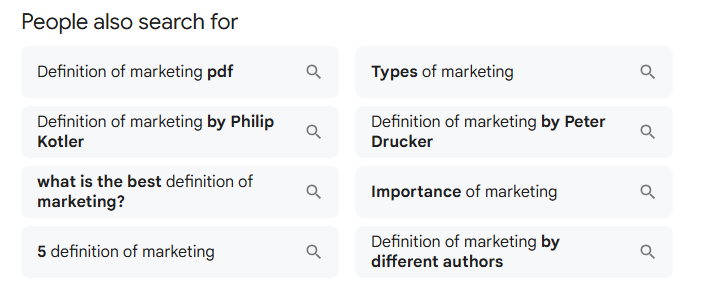
Google’s “People Also Search For” (PASF) feature surfaces related search queries that users commonly explore after conducting an initial search. These queries usually appear at the bottom of desktop SERPs or just above the “more results” line on mobile. Their presence signals Google’s commitment to guiding users toward deeper or broader versions of their original informational intent.
The User Behavior Behind PASF
PASF taps into user behavior patterns: Google tracks when individuals search, click on a result, then return (“pogo‑stick”) to the results. From this, it learns which follow‑up questions matter most. As a result, PASF queries reflect real searcher journeys—moving from general to specific or lateral searches that address gaps left by the primary content .
How PASF Differs from People Also Ask (PAA)
Although they sound similar, PASF and PAA serve distinct purposes:
- PAA: A cascading list of frequently asked questions directly related to your query, offering quick, in‑SERP answers.
- PASF: Related search terms that appear after users bounce back from initial results—a signal of intent shift or desire for more context.
In essence, PAA caters to diversifying the questions asked, while PASF guides users toward different or deeper topics related to the original query.
Why PASF Is a Goldmine for SEO
- Keyword Expansion & Topic Clustering
PASF queries provide insight into adjacent subtopics and long‑tail keyword opportunities. Covering these can strengthen your topical authority and boost rankings across a suite of related searches. - Content Gap Detection
If users consistently seek PASF terms, it indicates missing angles in your content that your competitors might be addressing better. Incorporating these insights helps close those gaps. - Better User Experience
Meeting the full spectrum of user intent keeps visitors engaged. Users are less likely to return to the SERPs if your page anticipates their next questions. - Improved Internal Linking & Site Architecture
PASF terms can inform internal linking strategies. Creating topic hubs or silo structures using those key phrases can enhance crawlability and semantic relevance.
How to Research and Leverage PASF
- Manual SERP exploration: Search your primary keyword, click on a result, then return. Capture the PASF terms that appear to guide your next content topics.
- SEO tools like Semrush: These platforms identify PASF‑style keywords—phrases users search before or after your target term. Use tools such as Keyword Magic or Topic Research to find clusters and prioritize based on volume and difficulty.
- Align with intent types: Organize new content or sections by intent—informational (deep‑dive guides), investigative/commercial (comparisons, reviews), and transactional (product pages). This ensures you capture audiences across the entire journey.
Getting Started with PASF Strategy
- Identify PASF suggestions manually or via tools.
- Map them into your content plan—either as new articles or sections/subheaders.
- Optimize on‑page elements (headings, meta tags, internal links) around those terms.
- Monitor rankings, click‑through rates, and engagement to evaluate performance.
By integrating PASF‑driven insight—whether manually reviewed or tool‑powered—into your content strategy, you not only meet user intent but also build comprehensive, intent‑aligned content clusters that Google rewards.
Why Does Google Show the “People Also Search For” Box?
Google’s goal has always been to deliver the most relevant, useful content to users. When someone performs a search and doesn’t find what they’re looking for on the first try, Google steps in with suggestions that reflect what other users in similar situations went on to search.
This behavior tells us three important things:
- Search intent is evolving. Users rarely settle on the first result; they’re refining and exploring further.
- PASF is based on actual user behavior. The queries listed are not speculative—they’re derived from aggregate user data.
- Google wants to keep users engaged. By offering better alternatives, Google keeps people within its ecosystem longer while improving the search experience.
For SEO professionals, PASF reveals not only what your content might be missing, but also how to fill those gaps by addressing adjacent topics or questions your target audience is likely to ask next.
People Also Ask vs. People Also Search For: What’s the Difference?
It’s easy to confuse “People Also Search For” with another Google feature, “People Also Ask” (PAA). Both provide related queries, but they work differently and serve different purposes.
People Also Ask (PAA):
- Appears directly in the SERPs as an expandable list of questions.
- Each question reveals a snippet-style answer when clicked.
- Designed to answer questions on the spot.
People Also Search For (PASF):
- Only appears after a user clicks a result and then returns to the SERP.
- Lists related search terms or alternative queries.
- Designed to help users refine their search journey.
From an SEO perspective:
- PAA is great for optimizing FAQ sections and targeting featured snippets.
- PASF is more useful for uncovering related long-tail keywords and building content clusters that support your core pages.
Understanding both features—and how to use them strategically—can lead to greater visibility across multiple parts of the SERP.
How to Find PASF Keywords
Unlike traditional keyword research tools, PASF keywords are typically uncovered through direct interaction with the search engine. Here are three effective methods to find them:
1. Manually in Google Search
Perform a search query that your target audience might use (e.g., “digital marketing services Gurgaon”). Click on a few results and then hit the back button. Observe the PASF box that appears under the result you just returned from. Note the variations and record any new or unexpected keyword suggestions.
2. Use SEO Browser Extensions
Tools like Keywords Everywhere, SEO Minion, or Surfer SEO’s SERP Analyzer can automatically extract PASF data as you browse. These tools often display PASF terms directly on the SERP, saving time and offering a larger set of suggestions.
3. SEO Platforms with SERP Analysis
Some premium tools like SEMrush, Ahrefs, and Moz Pro may include features that surface related queries similar to PASF, often under headings like “Related Keywords,” “Search Suggestions,” or “Phrase Match Keywords.” While not always labeled as PASF specifically, they provide similar insights based on search intent.
How to Use “People Also Search For” in Your SEO and Content Strategy
Now that you know what PASF is and how to find it, the next question is: How do you use it to grow your rankings and traffic?
Here are six practical ways to incorporate PASF into your SEO strategy:
1. Expand Existing Content
Audit your top-performing or underperforming blog posts and service pages. Identify relevant PASF queries and integrate them into your content as:
- Subheadings (H2 or H3)
- FAQ sections
- Internal anchor text
This not only improves the semantic depth of your content but also aligns better with evolving search intent.
Example:
Original blog topic: “What Is Digital Marketing?”
Relevant PASF terms to include:
- digital marketing vs traditional marketing
- benefits of digital marketing for small businesses
- Is digital marketing worth it in 2025?
By including these, you signal to Google that your content covers the topic comprehensively.
2. Create Supporting Blog Posts
Each PASF term can serve as a standalone blog topic. These posts can then link back to your pillar page, strengthening topical authority.
Example Cluster:
- Pillar: “Digital Marketing Services in Gurgaon”
- PASF blog ideas:
- “Top 5 Local SEO Strategies for Businesses in Gurgaon”
- “PPC or SEO: Which is Better for Small Businesses?”
- “What to Expect from a SEO Company in Gurgaon 2025”
This strategy helps you dominate multiple keyword variations and appear in different parts of the SERP.
3. Build Internal Link Networks
Use PASF terms as anchor text to connect related pages. This improves user navigation and helps Google understand the relationship between your content pieces.
Tip: Keep your anchor text natural. Instead of repeating exact-match keywords, use variations that reflect how users actually search.
4. Improve Conversion-Focused Landing Pages
Even your service or sales pages can benefit from PASF insights. If you’re a digital marketing company offering SEO, PPC, and social media services, include a comparison or FAQ section based on PASF queries like:
- How to choose between SEO and PPC?
- What is the cost of digital marketing services in India?
- Which agency is best for social media management?
These additions help you speak directly to the doubts and comparisons users are actively searching for.
5. Optimize for AI Overviews and Featured Snippets
Many PASF queries are question-based, which aligns perfectly with AI Overviews, Google’s featured snippets, and voice search.
To increase your chances of ranking in these spots:
- Use clear, concise answers (40–50 words is ideal)
- Apply schema markup (especially FAQPage)
- Include structured headings and bulleted lists
Answering PASF-style questions with precision enhances your content’s eligibility for zero-click search features.
6. Stay Ahead of Competitor Gaps
Finally, PASF helps you identify content gaps your competitors may have overlooked. If a top-ranking page fails to cover related queries revealed by PASF, you have an opportunity to step in and offer better coverage.
Over time, this strategy allows you to build authority in your niche while meeting more nuanced user needs.
Final Thoughts: Why PASF Deserves a Place in Your SEO Toolkit
The “People Also Search For” feature may not get as much attention as backlinks or technical SEO, but it delivers high-impact insights with minimal effort. In today’s intent-driven search environment, SEO success depends on how well you understand and fulfill user needs—not just how well you rank for one keyword.
By using PASF strategically, you can:
- Understand what your audience wants next
- Improve content relevance and completeness
- Build smarter content clusters around core topics
- Enhance internal linking and engagement
- Uncover new content opportunities faster than your competitors
For digital marketers aiming to stay ahead in 2025, PASF is not just a search feature—it’s a strategic advantage.
Need help building your SEO content strategy using PASF and other advanced techniques?
Delta Web Services can help you create intent-driven content that ranks, converts, and scales.
FAQs on “People Also Search For”
1. What are the top 10 most searched things on Google?
The top 10 most searched things on Google vary based on trends, news, and region, but globally common topics include:
- YouTube
- Weather
- News
- Maps
- Translate
- Amazon
Search trends often reflect current events, pop culture, sports, and tech releases. You can view live data on Google Trends.
2. What do “People Also Search For” in Google mean?
“People Also Search For” (PASF) is a feature in Google Search that shows related search queries users often look up after or alongside a particular search. It typically appears when someone clicks a result and quickly returns to the search page, signaling Google to offer additional, relevant options to explore.
3. Are “People Also Search For” accurate?
Yes, PASF suggestions are based on real user behavior and search patterns collected by Google. While they aren’t always contextually perfect, they’re generally relevant and highly useful for understanding related search intent.
4. What is the “People Also Ask” feature on Google?
“People Also Ask” (PAA) is a box in Google’s search results that contains commonly asked questions related to your query. When you click on a question, it expands to show a brief answer and often links to the source. It’s an excellent resource for identifying content gaps and capturing featured snippets in SEO.
5. What does “People Also Search For” mean?
“People Also Search For” refers to the list of additional search terms displayed by Google that users often explore after viewing a particular search result. It helps searchers refine or expand their query and discover closely related topics.
6. Are PASF keywords low competition?
Often, yes. PASF keywords tend to be long-tail keywords or variations that are not always targeted by larger competitors. This makes them valuable for smaller sites or blogs looking to rank for more specific queries with less competition and higher conversion potential.
7. How can I use the People Also Search For section for SEO?
You can leverage the PASF section in several SEO strategies:
- Keyword Research: Use PASF queries as long-tail keyword ideas.
- Content Expansion: Create blog posts or FAQ sections around these related searches.
- User Intent Matching: Understand what users are really looking for and tailor your content to meet that need.
- On-Page Optimization: Sprinkle relevant PASF terms into headings, subheadings, and meta descriptions.
- Internal Linking: Use PASF ideas to guide interlinking between related blog topics.
8. What are “People Also Search For”?
“People Also Search For” (PASF) is a Google feature that appears after you click on a search result and then quickly return to the search results page. It shows a set of related search queries that users often look up in connection with your original query. Essentially, it gives users alternative or follow-up keyword ideas to explore further.
9. Are People Also Search For accurate?
Generally, yes. PASF is based on real user behavior and data from Google’s vast search history. The suggestions are highly relevant because they reflect what people commonly search for after or alongside the original term. However, while accurate in reflecting search intent, they may not always perfectly match your specific needs—so it’s smart to analyze them with your context in mind.
10. Where do People Also Search For come from?
PASF suggestions come from Google’s search data and user behavior patterns. When users search for something and either bounce back or continue exploring, Google tracks those actions to surface related terms that might better match user intent. These terms reflect search journeys—how real people refine, broaden, or clarify their queries.
11. What is “People Also Asked For” (PASF)?
To clarify, there are two distinct but related features:
- PAA (People Also Ask): This shows dropdown-style related questions in SERPs.
- PASF (People Also Search For): This appears when you return from clicking on a result and shows other related searches.
In this context, PASF specifically helps users pivot their search journey by offering related search terms that might lead to better answers or deeper exploration.
12. Importance of PASF in SEO
PASF is important in SEO because it reveals real-time user intent and search paths, helping marketers understand what related topics or terms their audience cares about. Optimizing for PASF allows you to:
- Discover keyword variations and content angles
- Improve topical depth in your articles
- Create internal links around related queries
- Capture more organic traffic by answering adjacent queries
13. How PASF Can Alter or Extend User Search Behaviors?
PASF guides users toward longer search sessions and deeper research. It often leads people to refine their queries, explore new subtopics, or clarify their original intent. This means:
- Users don’t always stop at one click—they’re comparing and digging.
- Smart content creators can benefit by creating content that connects multiple PASF terms, keeping users engaged on their site longer.
14. Conducting Keyword Research Using PASF
You can use PASF to uncover low-competition, high-intent keywords. Here’s how:
- Search for your main keyword on Google.
- Click a result and then hit back.
- Look at the PASF terms that appear.
- Note the related questions or terms—they’re often long-tail and specific.
- Use SEO tools (like SEMrush, Ahrefs, or Surfer) to analyze their search volume and competitiveness.
This is especially useful for finding content gaps or support topics you might have missed.
15. Optimizing Content to Appear in PASF Recommendations
You can’t directly control PASF placement, but you can optimize your content to be more aligned with PASF terms:
- Naturally integrate PASF terms as subheadings or FAQs.
- Use schema markup (FAQ, Article, HowTo) to make content easier for Google to understand.
- Create in-depth content that answers not just the main query but related PASF queries.
- Improve page UX and reduce bounce rate to signal relevance.
Think of it as building a content hub that addresses all angles of a topic.
16. Analytics Tools to Track the Performance of PASF-related Keywords
While PASF data isn’t directly available in Google Search Console, you can use tools like:
- SEMrush and Ahrefs – To monitor keyword rankings and related keyword suggestions.
- Surfer SEO – To see content gaps and PASF-style recommendations.
- Google Trends – To track interest in related search queries.
- Keyword Insights.ai – Great for clustering PASF-related terms into topic groups.
Track rankings, CTRs, and engagement for those PASF-related terms to measure what’s working.
17. How PASF Optimization Fits Into a Broader SEO Strategy
PASF optimization is part of a holistic content and keyword strategy. Here’s how it fits in:
- Topic Clustering: PASF terms help build content clusters around your main keyword.
- Content Refreshing: Use PASF terms to update older blogs and keep them relevant.
- User Intent Mapping: PASF shows how user intent evolves—so you can tailor content accordingly.
- Long-Tail SEO: It opens doors to low-competition, high-conversion keywords.
It’s not a standalone tactic but a powerful supplement to on-page SEO, internal linking, and content depth.
18. Challenges & Strategies When Optimizing for PASF
Challenges:
- PASF terms can be unpredictable and change frequently.
- No direct analytics from Google.
- Appearing in PASF is not guaranteed.
Strategies:
- Update content regularly to reflect changing PASF suggestions.
- Build topical authority with interlinked content pages.
- Target PASF questions in FAQ sections using schema.
- Monitor SERP changes for your main keywords regularly.
Read Also:
What is Web Technology? Complete Guide
Top Branding Agency in India Revolutionizing the Industry in 2025


